
How to Build the Perfect Google Ads Custom Segments
Why Google Ads Custom Segments Are the Smarter Way to Reach High-Intent Audiences

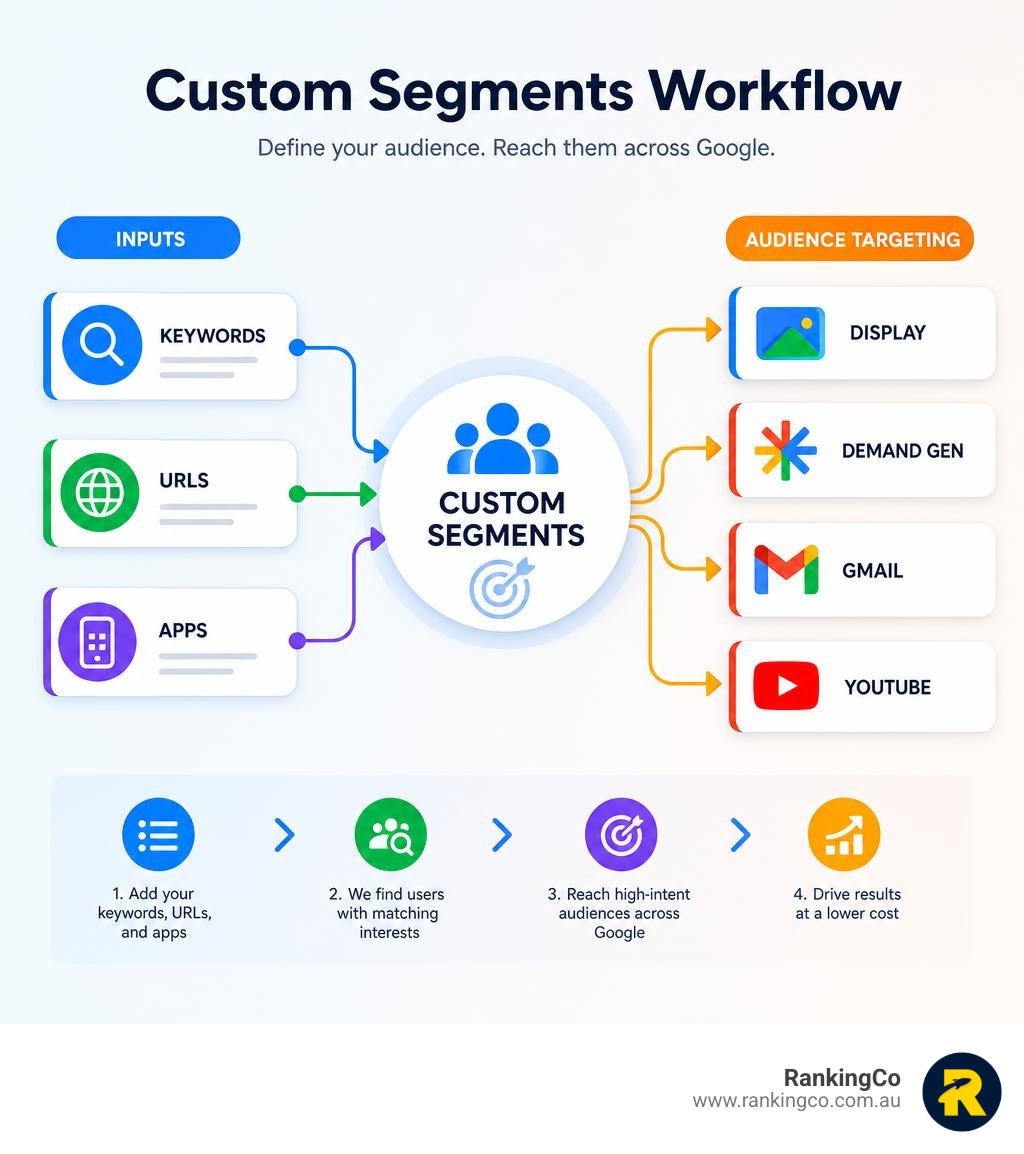
Google Ads custom segments let you build a targeted audience based on what users have recently searched for, browsed, or interacted with across the web. Here is a quick overview of what they are and how they work:
What are Google Ads custom segments?
- Custom segments are audience groups you define yourself using keywords, website URLs, and app names
- Google uses these inputs to find users who have shown matching interests or purchase intentions
- They are available across Display, Demand Gen, Gmail, and Video campaigns
- They replace the older Custom Intent and Custom Affinity audience types in a unified workflow
- Custom segments are account-specific and cannot be shared between Google Ads accounts
Why do they matter?
- Search CPCs have increased across many industries in recent years, leading many advertisers to explore complementary audience strategies
- Custom segments can help you reach high-intent users on YouTube, Gmail, and Discover in a lower-cost context than Search
- They give you more control over audience definition instead of relying only on Google's pre-built segments like "Sports Fans" or "Tech Enthusiasts"
Think about the user who just searched "best small business CRM" on Google. They did not click your ad, or maybe they did but did not convert yet. They are now checking their Gmail, watching a YouTube video, or scrolling through Discover. Custom segments can help you reconnect with that intent signal across Google's ecosystem without relying only on Search ads.
This is more than a niche targeting tactic. It can change how you think about audience strategy inside Google Ads. Instead of simply bidding harder in the same Search auction, you can test ways to reach similar high-intent users in different campaign contexts.
As our Google Ads team at RankingCo works with businesses across Australia, the underuse of custom segments is one of the common missed opportunities we see in accounts, regardless of budget size or industry.
I'm Kerry Anderson, co-founder of RankingCo and a digital marketing strategist with over 15 years' experience running performance campaigns across Google Ads, SEO, and paid media. Working with businesses from startups to $200M-plus revenue companies, I have used Google Ads custom segments as a core lever to reduce wasted spend and stretch advertising budgets further across the funnel.
Mastering Google Ads Custom Segments for High-ROI Campaigns
To build high-ROI campaigns, you must understand that Google Ads custom segments convert content-based targeting into audience-based targeting. Instead of showing ads on a specific website, you show ads to people who have recently demonstrated interest in that topic, regardless of the website they are currently browsing.
Google interprets your keywords, URLs and app inputs to identify users who demonstrate similar interests or purchase intent, with audience membership updating automatically over time.
Unlike standard affinity or in-market segments, custom segments do not restrict you to pre-defined categories. If you sell highly specific enterprise software or niche medical supplies, you can build an audience tailored precisely to your buyers. This custom approach can help you avoid relying only on broad pre-configured audiences. For more details on standard segment options, you can read the About custom segments - Google Ads Help documentation.
Step-by-Step Guide to Creating Google Ads Custom Segments
Creating a custom segment requires navigating to the Audience Manager in your Google Ads account and selecting your specific targeting criteria. By following a structured setup, you can ensure your segments are clean, highly targeted, and easy to measure.
Here is how to set up your first custom segment:
- Log into your Google Ads account, click on the Tools and Settings icon (the wrench), and select Audience Manager under the Shared Library section.
- Click the blue + button and select Custom segment from the dropdown menu.
- Name your segment using a clear naming convention (for example, Competitor URLs - June 2026 or High-Intent Search Terms - CRM ).
- Choose between the two primary interpretation options: "People with any of these interests or purchase intentions" or "People who searched for any of these terms on Google".
- Enter your inputs. You can add relevant keywords, website URLs (like competitor homepages), or app names.
- Click Save to build the segment. You can now apply this segment to your Display, Demand Gen, or Video campaigns.
When adding inputs, keep your segments clean. We strongly recommend creating separate segments for each input type rather than mixing keywords, URLs, and apps into a single segment. If you mix them, it becomes difficult to analyse which targeting criteria is actually driving your conversions.
It is also vital to understand how Google interprets website URLs. Entering a URL into a custom segment does not target that exact website as a placement. Instead, Google targets people who visit websites similar to the URLs you provided. If you want to dive deeper into general audience configurations, refer to About audience segments - Google Ads Help.
Advanced Strategies for Google Ads Custom Segments in 2026
A practical way to use Google Ads custom segments in June 2026 is to bridge the gap between expensive Search campaigns and Demand Gen campaigns. This strategy can help you test search-intent audiences in visual, discovery-led placements.
To execute this strategy, follow this workflow:
- Step 1: Open your existing Search campaigns and pull your Search Terms report.
- Step 2: Identify the top 20 to 30 non-branded search terms that have successfully driven conversions or high engagement.
- Step 3: Create a new custom segment using the option "People who searched for any of these terms on Google", and paste those exact search terms.
- Step 4: Build a new Demand Gen campaign and apply this custom segment to your ad group targeting.
- Step 5: Crucial Step: Turn off "Optimised Targeting" if your goal is to test the custom segment more narrowly. If you leave optimised targeting on, Google may expand your reach beyond your custom segment, which can make the test harder to interpret.
By targeting these search terms on Google-owned properties like YouTube, Gmail, and Discover, you can test intent-based audiences outside the Search auction. While a high-intent keyword may carry a premium cost per click on the Search Network, targeting users through a custom segment in a Demand Gen campaign may produce different CPC and conversion economics depending on your market, creative, offer, and bidding strategy.
Additionally, while you cannot target custom segments directly in Performance Max campaigns, you can use them as Audience Signals . This gives Google's machine learning system useful starting points when it looks for potential customers.
Conclusion
Building the perfect Google Ads custom segments is all about turning high-intent search data into a connected, cost-effective growth system. By moving beyond generic pre-built audiences and leveraging search-term and URL-based segments, you can combat rising Search CPCs and engage your buyers across Google's entire ecosystem.
At RankingCo, we believe digital marketing is a connected system where Google Ads, local SEO, and content creation work together to drive real business outcomes. If you are ready to optimise your campaigns and stop wasting ad spend, let's build a strategy that works for your business.
Ready to scale your digital presence? Explore our targeted services:
Frequently Asked Questions
What is the difference between custom segments and in-market segments?
Custom segments are built manually by the advertiser using specific keywords, URLs, and apps, offering precise control over targeting. In-market segments are pre-configured audience groups created by Google, consisting of users who are actively researching broader product or service categories.
Can you use custom segments in Performance Max campaigns?
You cannot apply custom segments as direct targeting constraints in Performance Max campaigns. However, you can add them as Audience Signals to guide Google's machine learning and help the algorithm identify high-converting users more efficiently.
How do custom segments compare to placement targeting?
Placement targeting delivers your ads to specific, exact websites or YouTube channels that you select. Custom segments do not target specific placements; instead, they target users who browse websites similar to the URLs you enter, turning content placement into user-behaviour targeting.
Why are my custom segment CPCs lower than Search campaigns?
Custom segments serve ads on visual, lower-cost networks like YouTube, Gmail, and Discover, which have significantly more ad inventory and lower competition than the highly contested Google Search results page. This allows you to target the same high-intent search users at a fraction of the cost.
Can custom segments be shared across different Google Ads accounts?
Google Ads custom segments are account-specific and cannot be shared directly between different accounts or manager accounts. They must be created individually within the Audience Manager of each specific Google Ads account.



Share online


