How to Reduce Google Ads Costs: A Smarter Approach to Paid Search
How to Reduce Google Ads Cost

RankingCo helps small and medium-sized businesses make paid media budgets work harder through practical campaign management, precise targeting and transparent reporting. To reduce Google Ads cost, focus first on cutting spend that is unlikely to produce a valuable enquiry or sale, then improve the relevance of the ads and pages that remain.
We do not recommend cutting budgets blindly. The most useful decisions come from reliable conversion tracking, an understanding of your service capacity and regular review of the searches, locations, devices and times that drive meaningful outcomes.
Key Takeaways
- Review recent search terms to find irrelevant clicks and add carefully considered negative keywords.
- Align keyword match types, locations, schedules and audience settings with the customers you can genuinely serve.
- Choose bids and budgets based on trustworthy conversion data, commercial priorities and the level of control a campaign needs.
- Improve the connection between keywords, ads and landing pages so paid traffic has a clearer path to enquiry or sale.
- Use RankingCo's Google Ads management services when you need expert support across campaign structure, tracking and optimisation.
Reduce Wasted Clicks and Improve Targeting
Search Terms
Wasted spend often starts before a bid is placed. If campaigns are eligible for searches that do not match what you sell, they can attract clicks without creating useful commercial opportunities. Review the Search Terms Report regularly to see the queries that triggered ads and separate genuine customer intent from research-only, employment-related or unrelated searches.
More active campaigns may need closer monitoring, while smaller or more stable campaigns can be reviewed less often. Look for recurring themes as well as individual queries, and keep account-level and campaign-level exclusions organised by purpose.
Negative Keywords
Negative keywords tell Google Ads not to show an ad when a search includes a term or phrase that does not suit the campaign. Add one when a query is clearly unrelated to your service, likely to attract the wrong audience or inconsistent with the action you want users to take. Depending on the business, examples may include searches containing “free”, “jobs”, “training”, “course”, “DIY” or an unrelated product category.
Not every low-volume or non-converting query is irrelevant. A specific search may have little history while still reflecting a credible commercial need your business can fulfil. Before excluding it, consider the searcher's intent, the offer, the landing page and whether clearer ad messaging or a tighter keyword grouping would be more appropriate. Add a negative keyword when the mismatch is clear, rather than simply because a query has not converted over a short period.
Match Types
Keyword match types should reflect the degree of control your campaign needs. Broad match can uncover useful demand when conversion tracking and bidding signals are dependable, but it requires active search-term monitoring. Phrase and exact match options can help when a business needs tighter alignment between its offer and the searches that trigger ads. A balanced structure can give the account room to learn without allowing irrelevant traffic to consume too much budget.
Location Targeting
Location settings deserve the same attention as keyword targeting. Before excluding an area or narrowing a campaign, confirm the business's actual service area, where it can respond to enquiries and whether customers in nearby locations can realistically be served. A Brisbane business that serves selected areas should not rely on a broad national footprint unless it can fulfil enquiries across that footprint.
Use location performance data alongside operational capacity and conversion quality. A location with fewer conversions may still be commercially worthwhile if it supports higher-value work or a strategic service area. Exclude unsuitable regions and focus campaigns on active service areas when the evidence supports that decision.
Ad Scheduling
Review performance by day and time before adjusting bids or campaign availability. Consider when the business can answer calls, follow up leads, deliver the advertised service and support customers after they enquire. The aim is not to switch campaigns off automatically during quieter periods, but to align spend with conversion data, enquiry-handling capacity and the times when prospects are most likely to take a meaningful action.
Audience Exclusions
Audience exclusions can provide another safeguard. Where appropriate and privacy-compliant, exclude existing customers or recent converters from acquisition campaigns when paying to reach them again does not support the campaign objective. Keep remarketing, retention and prospecting activity clearly separated so budgets are not working against one another.
Control Bids and Campaign Spend
Manual Bidding
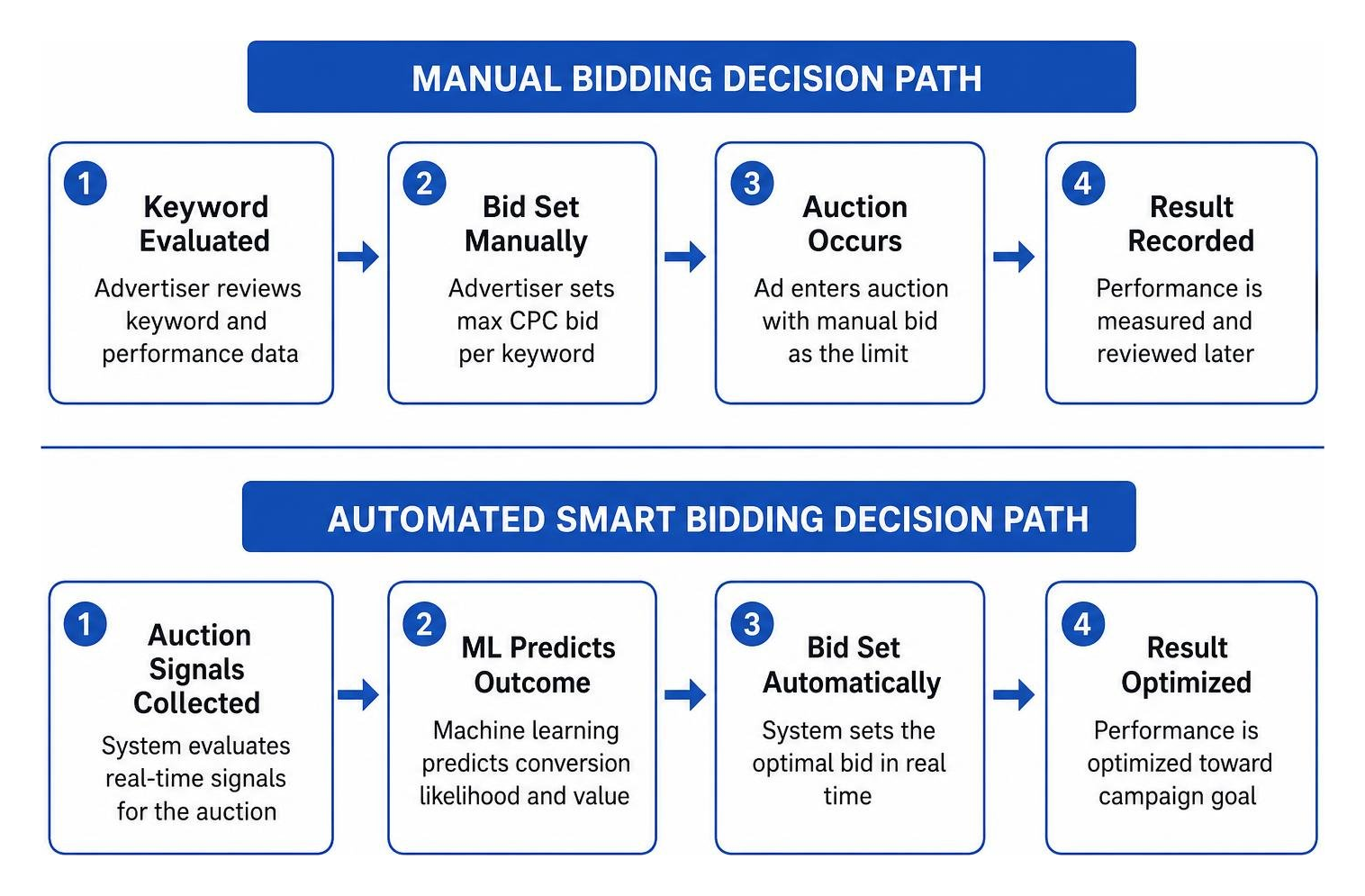
Manual cost-per-click bidding can be useful when a campaign needs close keyword-level control or when a business is testing a new market. It allows the advertiser to set and adjust bids directly, but it also requires consistent oversight to avoid missed opportunities or inefficient bid settings.
Automated Bidding
Automated bidding can be valuable when the account has trustworthy conversion signals and enough meaningful data to optimise towards the right outcome. Strategies focused on clicks may help build visibility, while strategies that prioritise conversions, cost per acquisition or return on ad spend may be appropriate when tracking reflects real business value.
There is no universal conversion threshold that makes one strategy right for every account. Bid strategy should reflect conversion quality, campaign objectives, tracking reliability and the amount of useful data available. Set safeguards where available, review performance during learning periods and avoid judging a strategy from a short results window.
Campaign Budgets
Campaign budgets should be reviewed alongside bidding choices. Google explains in its official campaign budget guide that daily spending can vary based on available traffic while monthly charging limits apply. Understanding that pacing can help businesses plan cash flow and investigate delivery changes without assuming that one day tells the full story.
Use budget reports to identify campaigns that spend consistently without producing meaningful outcomes. Before reducing a budget, check whether the issue is limited to certain queries, devices, locations, audiences, landing pages or times of day. A targeted correction can protect the parts of the account contributing to qualified demand.
Device Performance
A higher cost on mobile or desktop is not automatically a problem if that device produces more valuable enquiries or sales. Compare cost, conversion quality and the customer journey before applying bid adjustments. If the website is difficult to use on a particular device, improving the page may be more effective than simply reducing exposure.
Testing Changes
A disciplined testing process supports better cost control. Change one meaningful variable at a time where practical, document why the adjustment was made and allow enough time to assess the result against the campaign objective. This makes it easier to separate genuine improvement from normal day-to-day changes in auction conditions.
Improve Ad Relevance and Landing Page Performance
Keyword, Ad and Landing Page Alignment
Google Ads cost is shaped by more than the maximum bid. Ads and landing pages that closely reflect search intent can support a more efficient path through the auction and a clearer experience for the person clicking. For each important keyword theme, make sure the ad describes the relevant service, offer or next step rather than using one generic message across unrelated searches.
Keep the relationship between keyword, ad and landing page clear. If someone searches for Google Ads support for lead generation, the ad should explain the relevant benefit and lead to a page that continues that conversation. Sending every visitor to a general page can create friction, particularly when the user has expressed a specific need.
Ad Messaging
Responsive Search Ads should use accurate, useful messaging rather than repeated keyword variations. Use headlines and descriptions to clarify what the business does, who it helps and what the user can do next. Relevant assets such as sitelinks, callouts and structured snippets can make an ad more informative when they lead to accurate destinations and support the same intent.
Landing Page Experience
Landing page experience influences how efficiently paid traffic performs after the click. Pages should load reliably, be easy to use on mobile devices and make the next action clear. Remove distractions that prevent users from finding the service, key information or contact option they expected.
Conversion rate optimisation (CRO) matters here because a clearer page can help a business make better use of the traffic it already pays to attract. Before making major cost-cutting changes, check that phone calls, forms, purchases and other meaningful actions are being recorded accurately. Distinguish valuable leads and sales from low-value actions so campaigns are not optimised around clicks or cost per click alone.
Businesses that need help connecting campaign performance with on-site conversion paths can explore RankingCo's digital marketing services or contact RankingCo for a Google Ads account review.

Quality Score
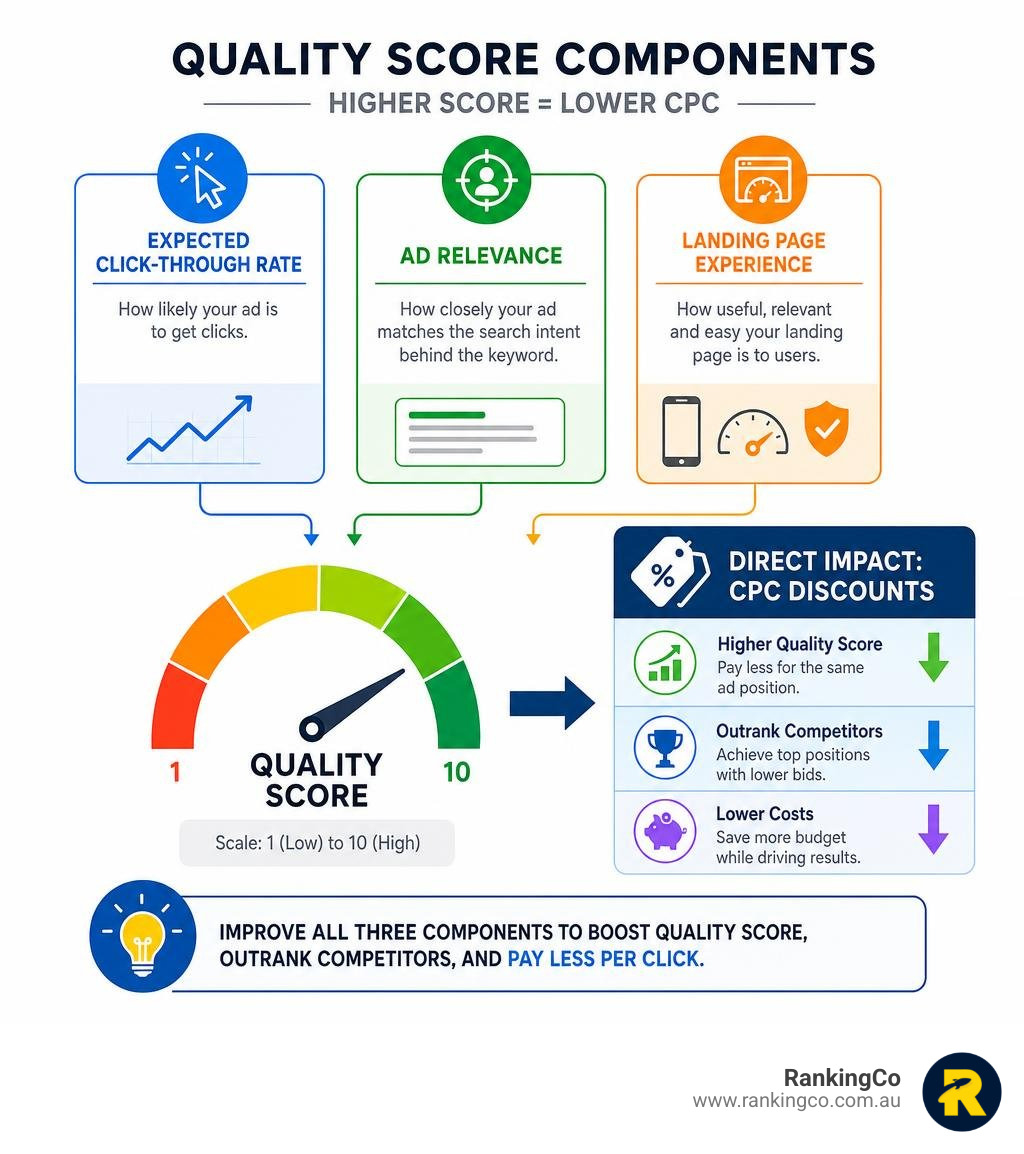
Quality Score is a diagnostic metric that can help advertisers investigate expected click-through rate (CTR), ad relevance and landing page experience for a keyword. It can highlight areas where the ad experience may not align closely with searcher intent, but it is not a simple cost-per-click discount system or a direct measure of the bid needed for a particular ad position.
Use Quality Score indicators as prompts for investigation alongside conversion data, search terms, auction conditions and commercial outcomes. Improvements are worthwhile when they create a more relevant experience for potential customers and support the campaign's actual objective.
Practical Next Steps for Lowering Google Ads Costs
Use this checklist to prioritise changes without cutting useful traffic too quickly:
- Check recent search terms and identify queries that do not match your services or commercial goals.
- Add clearly irrelevant searches as negative keywords while preserving potentially useful low-volume demand.
- Review locations and service areas against where the business can genuinely respond to and fulfil enquiries.
- Check device and time-of-day performance alongside lead quality and enquiry-handling capacity.
- Review bidding and budget settings in the context of campaign maturity, objectives and reliable data.
- Check conversion tracking before making major changes so calls, forms, purchases and other meaningful outcomes are being recorded correctly.
Document the changes you make and compare results with the campaign's real purpose, such as qualified enquiries, booked consultations, sales or repeat purchases. This provides a more useful basis for optimisation than focusing on cost per click alone.
Build a More Efficient Google Ads Account with RankingCo
Reducing Google Ads costs is about improving relevance, control and decision-making across the account. RankingCo works with Australian businesses to connect paid advertising with the wider customer journey, helping teams focus their budget on the opportunities that matter most.

Frequently Asked Questions About How to Reduce Google Ads Cost
Can I reduce Google Ads costs without reducing leads?
Yes, but the goal should be to reduce irrelevant or low-value spend rather than simply cutting exposure. Start with search terms, negative keywords, targeting, conversion tracking and landing page alignment so valuable demand is not removed with wasted clicks.
Why is my Google Ads CPC so high?
A high cost per click can reflect strong competition, valuable customer demand, broad targeting, low ad relevance or a landing page that does not closely match the search. Review the full journey from keyword to conversion before treating CPC alone as the problem.
Should I lower my Google Ads budget or improve my campaign first?
Review campaign quality first. If spend is being wasted on irrelevant searches, unsuitable locations or weak conversion paths, targeted improvements may be more useful than a blanket budget reduction. Reduce budgets when the data shows a campaign is not supporting a worthwhile outcome.
Does Quality Score affect Google Ads cost?
Quality Score is a diagnostic metric based on expected CTR, ad relevance and landing page experience. It can help identify areas to investigate, but it should not be treated as a simple discount mechanism or the only explanation for campaign costs.
How often should I optimise Google Ads?
Review frequency should match campaign activity, budget and the volume of meaningful data available. Active campaigns often need regular search-term and conversion reviews, while stable accounts may benefit from a consistent scheduled review rather than constant changes.
How do negative keywords lower Google Ads spend?
Negative keywords help prevent ads from showing for searches that are unrelated, unqualified or inconsistent with the campaign goal. They can protect budget from unwanted clicks when exclusions are based on clear search-intent evidence.
When should an advertiser use automated bidding?
Automated bidding is most useful when conversion tracking is reliable and the account has meaningful data to optimise towards the right business outcome. The right timing depends on conversion quality, campaign objectives and tracking accuracy, not a universal conversion threshold.






Share online