Mastering the Launch: Your First Google Ads Campaign Setup
Why Getting Your First Campaign Right Actually Matters

Google Ads Campaign Setup can feel like stepping into a maze. You know ads can drive traffic and sales, but where do you start?
Here’s a quick overview of what matters most:
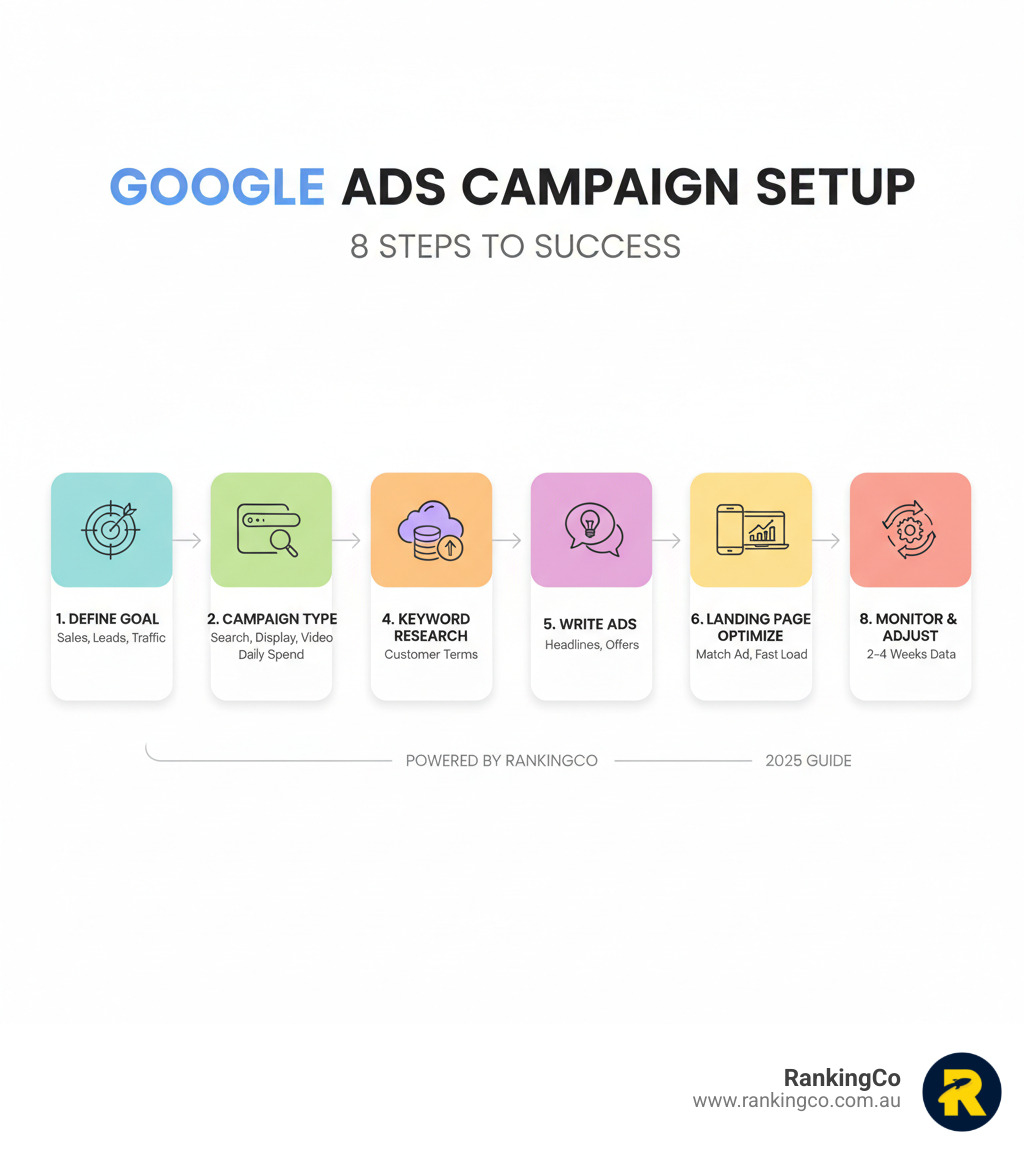
- Define your goal: Choose between Sales, Leads, Website Traffic, or Brand Awareness.
- Pick your campaign type: Select from Search, Display, Video, Shopping, or Performance Max.
- Set your budget: Start with a daily amount you're comfortable testing.
- Research keywords: Find the terms your customers actually use.
- Write compelling ads: Use clear headlines and a strong call to action.
- Optimise your landing page: Ensure it matches your ad and loads fast on mobile.
- Track conversions: Set this up from day one to measure what works.
- Monitor and adjust: Give campaigns 2-4 weeks to gather data before making big changes.
Many small businesses waste money on Google Ads by skipping these fundamentals. They rush into bidding on expensive keywords or send traffic to a generic homepage, resulting in costly clicks that don't convert.
The good news is that a well-structured campaign can deliver a significant return on investment. This guide breaks down the practical steps we use at RankingCo to build campaigns that perform, helping you launch with confidence.
I'm Kerry Anderson, co-founder of RankingCo. With over 15 years of experience, I've helped businesses turn ad spend into revenue. My approach focuses on clear goals, smart targeting, and continuous optimisation.
Foundations First: Understanding the Google Ads Landscape
Launching a Google Ads campaign can feel overwhelming, but it doesn't have to be. With the right foundation, you can turn Google's vast network into a powerful engine for business growth. We're here to turn complexity into clarity.
What is a Google Ads Campaign and Why Does it Matter?
A Google Ads campaign promotes your business across Google’s network, including search results, websites, and YouTube. It’s a strategic way to get your message in front of people actively looking for what you offer.
This matters because it connects you with customers at the exact moment they need a solution, driving quality traffic, generating leads, and boosting sales. With a strategic setup, Google Ads offers a measurable return on investment (ROI).
Here are some basic terms to know:
- Keywords: The words or phrases people type into Google that trigger your ads.
- Bid: The maximum you're willing to pay for a click on your ad.
- Quality Score: A 1-10 rating from Google on the relevance of your ad and landing page. Higher scores can lead to lower costs.
- Ad Rank: Determines your ad's position on the page, influenced by your bid and Quality Score.
- CPC (Cost-Per-Click): The actual amount you pay for each click.
- Conversion: A desired action a user takes after clicking your ad, like a purchase or form submission.
Choosing Your Mission: Campaign Types and Objectives
Before you start, you must define your business goal. Are you aiming for sales, leads, website traffic, or brand awareness? Your answer guides your entire Google Ads Campaign Setup .
Once your objective is clear, you’ll choose a campaign type to match. Each is designed for different goals and platforms. You can learn more about campaign types here.
Here are the most common campaign types:
- Search: Text ads on Google search results, perfect for reaching people actively looking for your services.
- Display: Visual banner ads across websites and apps, great for brand awareness.
- Video: Ads on YouTube, ideal for engaging storytelling.
- Shopping: Product listings with images and prices, essential for e-commerce.
- Performance Max: An AI-driven campaign that finds customers across all of Google's channels to maximise sales and leads.
A well-structured account is key. Your account is organised into Campaigns (your main goals) and Ad Groups (smaller, focused groups of keywords and ads).
The Ultimate Google Ads Campaign Setup Checklist
Setting up your first campaign doesn't have to be a guessing game. We've distilled our experience into a simple, actionable checklist to ensure your Google Ads Campaign Setup is solid from day one.

Step 1: Budgeting, Bidding, and Keywords for Your Campaign
This is where you decide how much to spend and what words will trigger your ads. It's a critical step that directly impacts your campaign's reach.
Setting Your Daily Budget
You control your spending by setting an average daily budget for each campaign. Google aims to spend this amount over a month, though daily spend may vary. For context, the average cost per click (CPC) across industries is around $4.66. This figure helps set realistic expectations.
Choosing Your Bidding Strategy
Your bidding strategy tells Google how to spend your budget to meet your goals.
- Manual Bidding: You set bids for each keyword, offering maximum control but requiring more management.
- Automated Bidding: Google’s AI optimises bids in real-time to achieve your objective (e.g., maximising conversions). This is very helpful for beginners.
Conducting Keyword Research
Keywords connect what people search for with your business. Use Google's free Keyword Planner to find relevant terms and estimate costs. This helps you understand customer intent.
Identifying irrelevant keywords to avoid is just as important as finding good ones.
Understanding Keyword Match Types
Match types control how closely a search must match your keyword for an ad to show. This is vital for managing spend. You can explore keyword match types here.
- Broad Match: Offers the widest reach, showing your ad for related searches.
- Phrase Match: Shows ads for searches that include the meaning of your keyword. More controlled than broad match.
- Exact Match: Shows ads only for searches with the same meaning as your keyword, offering the tightest control.
- Negative Keywords: These are terms you don't want your ads to show for. Adding them is essential to avoid wasting money on irrelevant clicks (e.g., adding "free" if you don't offer free services).
Step 2: Crafting Ads, Targeting, and Landing Pages
Once your budget and keywords are sorted, it's time to build the ads and decide who sees them.
Writing Compelling Ad Copy
Your ad is a customer's first impression. It must be clear, compelling, and have a strong call to action (CTA).
With Responsive Search Ads, you provide multiple headlines and descriptions. Google's AI then tests different combinations to find what works best.
Leveraging Ad Extensions
Ad extensions add extra information to your ads, like site links, phone numbers, or special offers. They give people more reasons to click and can significantly boost performance.
Add as many relevant extensions as you can. While Ad Strength is a helpful feedback tool for best practices, it doesn't directly impact auction performance.
Strategic Targeting Options
Precision targeting ensures your ads reach the right people.
- Location: Target specific areas, from a suburb in Brisbane to cities like Sydney or Auckland.
- Language: Target users based on their language settings.
- Device: Adjust bids for mobile, desktop, or tablet users based on performance.
- Audience Segments: Target groups based on interests, demographics, or past website visits (remarketing).
Implementing Ad Scheduling (Dayparting)
Ad scheduling lets you choose specific times and days for your ads to run. This optimises your budget by showing ads when customers are most likely to convert.
Optimising Your Landing Page for Conversions
Your landing page is where clicks turn into customers. A great ad needs an equally great landing page, as Google evaluates this experience for your Quality Score.
Your landing page must:
- Match your ad's message: If your ad promises a discount, the page must show it.
- Be easy to use: Ensure simple navigation and a mobile-friendly design.
- Be keyword relevant: Include the keywords you're bidding on.
- Load quickly: Slow pages lose customers.
- Have a clear Call to Action (CTA): Tell visitors exactly what to do next (e.g., "Buy Now," "Get a Quote").

Launch, Learn, and Win: Post-Launch Success
Your campaign is live, but launching is just the beginning. The real work starts now.

When a campaign goes live, it enters a "learning phase." During this time, Google's AI gathers data to learn how to best serve your ads. This process usually takes 2-4 weeks to deliver consistent results.
It’s tempting to make changes immediately, but patience is key. Big adjustments too early can reset the learning phase, so let the data build up before making informed decisions.
A successful campaign requires continuous improvement, not a "set and forget" approach.
Monitoring Performance and Avoiding Common Google Ads Campaign Setup Mistakes
Monitor key metrics to understand performance. These include impressions , clicks , conversions , cost per click (CPC) , and cost per acquisition (CPA) .
For deeper insights, connect your account to Google Analytics to see the full customer journey. You can learn how to connect Google Analytics here.
Avoid these common, budget-draining mistakes:
- Vague goals: Without a clear objective (sales, leads), you can't measure success.
- Poor account structure: Disorganised campaigns and ad groups lead to wasted spend.
- Ignoring negative keywords: Failing to filter out irrelevant search terms costs you money.
- Weak landing pages: If your landing page doesn't match your ad's promise, you'll lose conversions.
- A "set and forget" mentality: Google Ads requires regular monitoring and adjustments to stay effective.
Ready to Be Seen? Let's Get You Found Online
Mastering your Google Ads Campaign Setup is about building a marketing engine that drives real growth. A strategic setup ensures your budget is spent wisely and your ads reach the right audience. This helps you achieve a strong return on investment.
Feeling overwhelmed is normal, but you don't have to do it alone.
At RankingCo, we specialise in helping businesses scale and expand across Australia, New Zealand, the US, and Canada. Our team uses full-funnel marketing, from paid ads to global SEO, leveraging advanced AI to keep you ahead of the curve.
From our headquarters in Brisbane, our team helps clients in Sydney, Melbourne, and beyond to master Google Ads. Ready to get found by your ideal customers? Get expert Google Ads Management with RankingCo and let's grow your business.



Share online