You Need Bing Ads Negative Keywords for Precise Targeting
Why Smart Advertisers Never Skip Bing Ads Negative Keywords

Every day, businesses waste their hard-earned budget on clicks that were never going to convert. Imagine someone searching for "free accounting software" when you only sell premium plans. Or someone looking for "tennis courts" when you sell tennis shoes. Without Bing Ads negative keywords, your ads appear for these irrelevant searches, burning through your daily budget on the wrong audience.
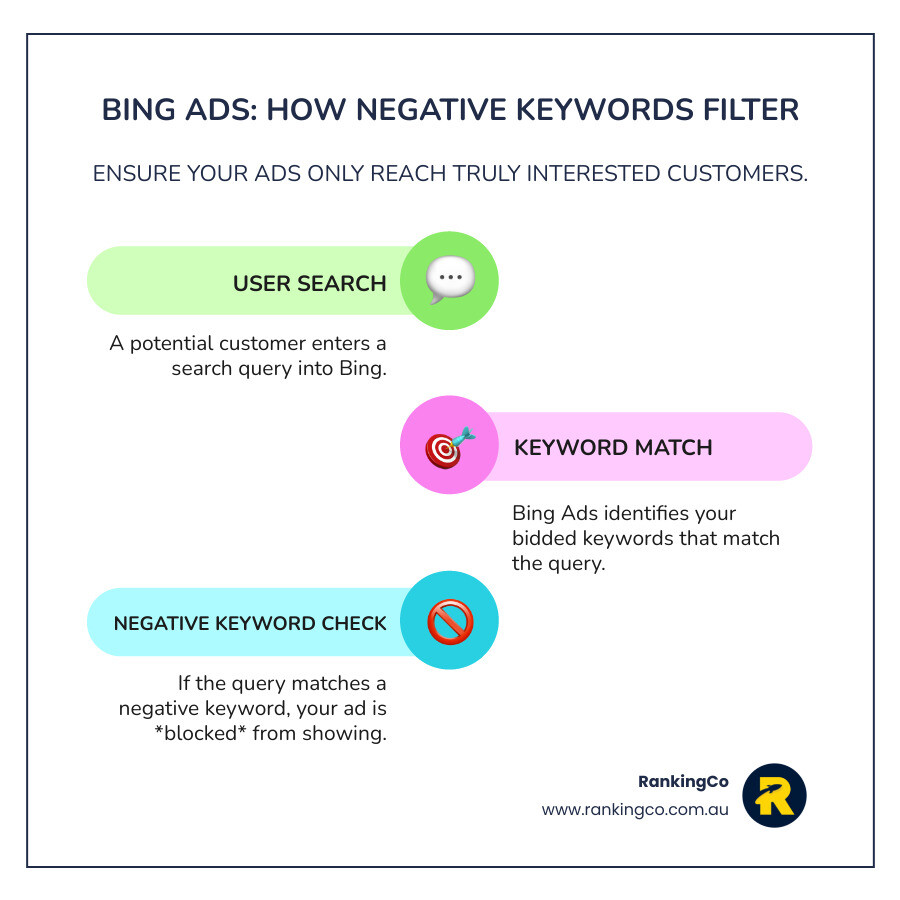
Bing Ads negative keywords are specific words or phrases you add to your campaigns to stop your ads from showing for irrelevant queries. They help you protect your budget and focus your spend on customers who are actually interested in what you offer.
Here is a quick look at how they work:
- Two match types : Exact match (blocks the exact phrase) and phrase match (blocks any query containing the phrase in order).
- Three levels : Account-level (affects everything), campaign-level (affects all ad groups), or ad group-level (affects specific groups).
- Shared lists : Create reusable lists of up to 5,000 keywords to apply across multiple campaigns.
- Key limits : You can have up to 20 shared lists per account.
I am Kerry Anderson, and over the past 15 years, I have helped businesses cut ad waste by 60-70% through strategic use of these tools. At RankingCo, we find that most businesses miss simple exclusions that could save thousands in wasted spend. Let's explore how you can master this for your own brand.
How to Implement Bing Ads Negative Keywords for Maximum ROI
Implementing Bing Ads negative keywords is a critical strategy for maximising your return on investment (ROI). By refining your targeting, you ensure your budget is spent on genuinely interested potential customers. This leads to higher conversion rates and improved campaign efficiency for your Brisbane, Sydney, or Melbourne business.
A well-managed negative keyword list is essential for any business running paid search campaigns. It helps us avoid paying for clicks that will never turn into a sale. According to the Microsoft Advertising help documentation, negative keywords help you "get to the right customers" by preventing ads from showing for irrelevant terms. This precision directly impacts your Quality Score, which influences your ad ranking and cost per click.
Understanding Negative Keyword Match Types in Bing Ads
Just like regular keywords, Bing Ads negative keywords use different match types. Understanding these is vital for effective budget management. The two primary types are Phrase match and Exact match.
Negative Phrase Match
With a negative phrase match, your ad will not show if the search query contains the exact phrase in the exact order. It is a powerful tool for blocking variations of a specific irrelevant phrase. For example, if you sell "running shoes" and add "free delivery" as a negative phrase match, your ad won't appear for "running shoes free delivery". However, it might still show for "running shoes delivery costs" because the exact phrase "free delivery" is missing.
Negative Exact Match
A negative exact match keyword prevents your ad from showing only if the search query precisely matches the negative keyword. This offers the highest level of precision. If you add "[cheap shoes]" as a negative exact match, your ad will not show for "cheap shoes." But it will still show for "cheap running shoes" because that is not an exact match. Tools like Karooya’s Negative Keywords Tool can help you manage these lists effectively.
| Match Type | How it Works | Example | Search Query Triggers Ad? |
|---|---|---|---|
| Negative Phrase Match | Blocks query if it contains the exact phrase in order. | "used cars" | "buy used cars" - No |
| "cars used for racing" - Yes | |||
| Negative Exact Match | Blocks query only if it is an exact match. | [free trial] | "free trial" - No |
| "free trial software" - Yes |
Where to Apply Your Exclusions
Bing Ads allows us to apply exclusions at various levels, giving us granular control over your ad visibility. This multi-layered approach ensures your campaigns are efficient, if you are targeting customers in Perth or Adelaide.
- Account Level : These prevent ads from showing across all campaigns in your account. This is perfect for terms like "jobs" or "free" if you only offer paid services.
- Campaign Level : These apply to all ad groups within a specific campaign. This is useful for excluding terms irrelevant to a particular product line.
- Ad Group Level : This is the most precise level. For example, if an ad group focuses on "men's hiking boots," you might add "women's" as a negative keyword here.
- Shared Negative Keyword Lists : You can create lists of up to 5,000 keywords and apply them to multiple campaigns. This is incredibly efficient for managing Microsoft Leads Ads Management accounts.
Finding and Adding Bing Ads Negative Keywords to Your Campaigns
Finding and adding Bing Ads negative keywords is an ongoing task. It requires analysis to ensure we are constantly refining your spend. The most effective way to find new negatives is by reviewing your search term reports. We look for searches that are clearly irrelevant, indicate low purchase intent, or relate to services you do not offer.
Once we have identified the keywords, adding them is simple:
- Log in to your Microsoft Advertising account.
- Select the account, campaign, or ad group level.
- Go to 'Keywords' and then 'Negative Keywords'.
- Click 'Add Negative Keyword' and enter your terms.
- Choose the match type (Phrase or Exact) and save.
For larger lists, you can upload a spreadsheet for bulk changes. This ensures efficient management of your budget, similar to how we manage Google Ads for our clients.
Managing Conflicts and Platform Limitations
Managing Bing Ads negative keywords can sometimes lead to conflicts with your bidded keywords. A significant rule in Bing Ads is that negative keywords cannot supersede bidded keywords if they are identical. If you bid on "red socks" and also have it as a negative exact match, your ad will still show. The bidded keyword takes precedence.
To help with this, Bing Ads provides a 'keywords conflict report'. We regularly review this for our clients to resolve issues promptly. Also, keep in mind that negative keywords do not filter close variants like plurals or misspellings. If you want to exclude "shoe" and "shoes," you must add both separately. Finally, remember the 16-word limit; if a negative keyword appears very late in a long search query, it might not block the ad.
Get Expert Help and Watch Your Business Grow
Managing Bing Ads negative keywords can be complex. Partnering with digital marketing professionals like us at RankingCo can make a significant difference. We are the digital marketing experts in Brisbane and across Australia, with a global reach.

Our team focuses on delivering real ROI and scalability. We like to think of ourselves as the world’s best little digital agency, combining global expertise with a personalised touch. If you need help with Microsoft Leads Ads Management or Microsoft eCommerce Ads, we have the tools to help you thrive.
The Future of Negative Targeting in the AI Era
At RankingCo, we integrate advanced AI technologies into our strategies. This allows us to identify irrelevant search patterns faster and automate exclusions more efficiently. Generative AI is changing how users find information, and we are proactively optimising for AI-generated visibility.
This involves two key approaches. First, we strengthen organic data training signals through high-quality content and site authority. This helps AI models recognise your brand as a credible source. Second, we leverage paid partnerships for placements like sponsored summaries within AI responses. Our AI-driven strategy for Bing Ads negative keywords helps our Brisbane digital marketing clients stay competitive.
Final Steps for Your Success
Effective management is an ongoing commitment. It is not a "set and forget" task. Our team ensures your campaigns are always optimised through thorough account audits and regular maintenance. We continuously review search term reports to keep your lists up to date.
By trusting your campaigns to our expert team, you gain a partner dedicated to your long-term success. We help you protect your budget, refine your targeting, and drive more qualified leads for your business. If you are looking for a Brisbane SEO expert or PPC specialist, we are here to help.
Take Your Brand to New Heights with a Google Premier Partner
Mastering Bing Ads negative keywords is essential for a successful online strategy. It ensures your budget is spent wisely on the right audience. Don't let irrelevant clicks drain your ad budget. Let our team of experts help you implement a strategy that saves you money and boosts your ROI.
Ready to optimise your campaigns and achieve greater success? Contact Us today to start your journey with RankingCo, your trusted digital marketing partner.




Share online